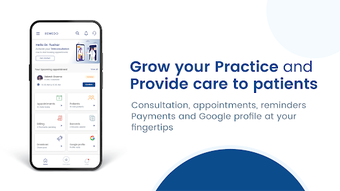

Download Remedo Doctor APK – Digital Clinic, Online Consultation, Telemedicine, Doctor Practice Management
Overview
Remedo Doctor is a digital clinic platform designed for medical professionals seeking to conduct online consultations and manage their practice remotely. The app serves as a comprehensive tool for doctors to expand their reach, engage with patients, and streamline clinical workflows. It enables practitioners to build their personal brand, enhance visibility, and grow their patient base through a secure, user-friendly interface. The platform supports real-time communication, appointment scheduling, prescription management, and patient reminders—key components for modern telemedicine practices.
Target users include independent doctors, private practitioners, and healthcare providers aiming to transition or supplement their services with online consultations. The app is particularly suited for professionals who wish to increase patient footfall, improve satisfaction, and drive repeat visits without significant upfront investment. By offering a centralized system for patient interaction and practice management, Remedo Doctor aims to simplify digital healthcare delivery.
Developed by Remedo Apps, the application is available as a free download on the Google Play Store. While specific details about the company’s background are not provided, the platform emphasizes ease of access, security, and functionality. Real-world use cases include remote consultations, follow-up appointments, prescription delivery, and ongoing patient engagement—all from a mobile device.
Key Features & Capabilities
- Online Consultations – Enable video and audio calls with patients, allowing doctors to deliver care from any location with internet access.
- Appointment Scheduling – Set and manage patient appointments, reducing no-shows through automated reminders.
- Prescription Management – Generate and send digital prescriptions directly through the app, improving accuracy and accessibility.
- Real-Time Messaging – Communicate with patients via secure chat, send messages, and share files for follow-ups or diagnostics.
- Identity Verification – Onboarding includes verification of medical credentials, ensuring professional legitimacy and trust.
- Practice Branding Tools – Customize profiles and visibility settings to help doctors establish a professional digital presence.
- Remote Patient Engagement – Facilitate ongoing interactions, track patient history, and support repeat consultations.
These features collectively support a seamless telemedicine experience. For instance, a doctor can schedule a follow-up, send a prescription via chat, and confirm the appointment through automated reminders—all within the same interface. This integration reduces administrative burden and enhances patient satisfaction. The app is designed to help doctors scale their practice without needing physical infrastructure, making it ideal for solo practitioners or those expanding into digital care.
User Interface, Workflow & Performance
Remedo Doctor features a clean, intuitive interface designed for ease of navigation. The layout prioritizes accessibility, with clearly labeled sections for consultations, appointments, messages, and profile settings. Users can quickly switch between functions without navigating through multiple layers, contributing to a smooth workflow.
Navigation is straightforward, with a bottom menu bar providing quick access to core features. The design emphasizes usability, minimizing the learning curve for doctors unfamiliar with digital platforms. Tasks such as starting a video call, sending a prescription, or viewing patient history are accessible with minimal taps.
Performance details were not specified by the developer. However, based on general mobile application behavior, the app is expected to function efficiently on devices with stable internet connectivity. The developer did not provide information on CPU or RAM usage. Stability during video calls and message delivery is assumed to be optimized for common Android devices, though actual performance may vary depending on network conditions and device capabilities.
Compatibility & System Requirements
Remedo Doctor is available for Android devices and can be downloaded as an APK file. The application is designed to run on modern Android operating systems, though specific version requirements were not listed. Installation size and hardware specifications were not disclosed by the developer.
Compatibility information is limited to the Android platform. No details were provided regarding minimum screen resolution, processor speed, or memory requirements. The developer did not specify whether the app supports tablets or wearables. Users are advised to ensure their device meets general Android compatibility standards for running third-party applications.
Pros and Cons
Pros
- Free to download and use with no hidden costs
- Supports online consultations and remote patient management
- Simple, clean interface designed for quick adoption
- Includes appointment scheduling and automated reminders
- Secure messaging and prescription sharing capabilities
- Enables doctors to build and manage their digital brand
- Accessible anytime, anywhere with internet connectivity
Cons
- System requirements and device compatibility were not specified
- Performance data such as CPU or RAM usage was not provided
- No information on offline functionality or data sync behavior
- Android-only availability limits cross-platform access
- Identity verification process may require time and documentation
FAQ Section
Is Remedo Doctor available for iOS devices?
As of now, the app is only available for Android. There is no official information on iOS support.
Is the app secure for patient data?
Remedo Doctor is described as a secure platform that ensures patient privacy and data protection. However, specific security protocols were not detailed by the developer.
Can I use Remedo Doctor without paying anything?
Yes, the app is available for free. There are no reported additional costs for basic features or usage.
How do I get started with the app?
To begin, create an account using a username, password, and email. You will then need to verify your identity and submit your medical credentials.
Does the app support video calls for consultations?
Yes, Remedo Doctor includes video call functionality to enable real-time online consultations with patients.
Final Thoughts + CTA
Remedo Doctor presents a compelling solution for doctors aiming to establish or expand their online presence. With its focus on simplicity, security, and essential telemedicine tools, it offers a practical entry point into digital healthcare delivery. While specific technical details are limited, the app’s core features align with modern medical practice needs—appointment management, secure communication, and remote consultations.
Its free model and mobile-first design make it accessible to a wide range of practitioners, especially those seeking low-cost, scalable digital solutions. Although compatibility and performance data are not fully disclosed, the app’s clean interface and workflow efficiency suggest a user-centric approach.
For medical professionals ready to embrace telemedicine without major investment, Remedo Doctor offers a functional and accessible platform. It’s particularly well-suited for solo practitioners and clinics looking to enhance patient engagement and grow their practice digitally.
Download Remedo Doctor now





.png)

